
Speed Up Baidu Pan Video Playback
Overview
The Baidu Pan Video Player Speed extension is designed to improve the video playback experience on Baidu Netdisk, a widely used cloud storage platform in China. This tool specifically addresses the need for customizable playback speed, allowing users to adjust video playback rates directly within the browser interface. The extension targets individuals who frequently access video content stored on Baidu Netdisk, including students reviewing lecture recordings, professionals analyzing training materials, and content creators evaluating reference footage.
By enabling faster playback, the extension helps users save time and increase productivity when consuming video content. It operates as a browser add-on, integrating seamlessly with existing workflows without requiring complex setup or additional software installations. The developer did not provide additional background information, and no specific user profiles were detailed beyond the general use cases. However, the tool’s purpose is clearly focused on enhancing media playback functionality in a niche but relevant context.
Real-world applications include speeding up tutorial videos, accelerating educational content, and streamlining video reviews. The extension is particularly useful in environments where time efficiency is critical. As a lightweight utility, it is intended for users who prefer simple, targeted solutions rather than full-featured media players.
Key Features & Capabilities
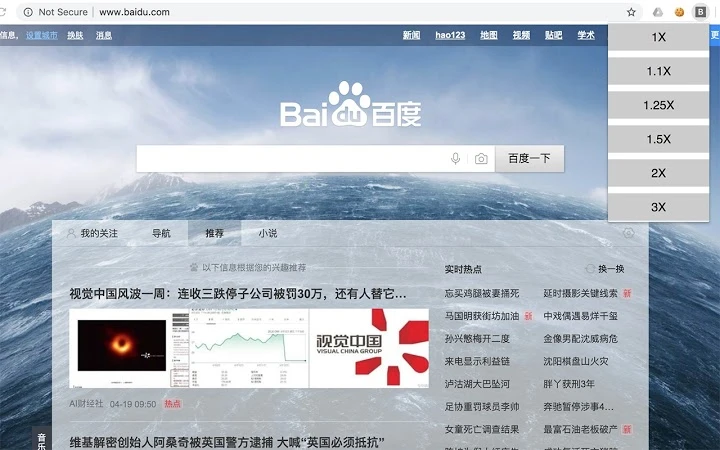
- Playback Speed Control – Allows users to adjust video playback speed in real time, enabling faster viewing of content without compromising audio clarity.
- Browser Integration – Functions directly within supported web browsers, eliminating the need for external media players or downloads.
- Lightweight Design – At just 2.3 MB, the extension is minimal in size and designed to run efficiently without consuming significant system resources.
- Quick Activation – Once installed, the speed controls appear automatically when a video is played on Baidu Netdisk, requiring no additional steps to enable.
- Compatibility with Baidu Netdisk – Specifically built to work with Baidu Pan’s video player interface, ensuring reliable functionality across supported video formats.
These features allow users to efficiently manage video content without leaving the Baidu Netdisk environment. For example, a student can watch a 60-minute lecture at 1.5x speed, reducing viewing time by nearly a third. Similarly, a content researcher can quickly scan through multiple video clips by increasing playback speed, improving workflow efficiency. The extension’s targeted functionality makes it ideal for users seeking a simple, no-frills enhancement to their video consumption process.
User Interface, Workflow & Performance
The user interface of the Baidu Pan Video Player Speed extension is minimal and focused on functionality. It integrates directly into the video player controls on Baidu Netdisk, adding speed adjustment options without cluttering the interface. Navigation is straightforward: once installed, the controls appear automatically when a video is loaded, requiring no additional user input to activate.
Workflow efficiency is enhanced by the extension’s seamless integration. Users can adjust playback speed with a single click or keyboard shortcut, depending on browser settings. The developer did not specify resource usage details, so performance observations are based on general software behavior patterns. However, given its small size and browser-based nature, the extension is expected to operate smoothly on most modern systems.
Stability is likely maintained through standard browser extension frameworks, which handle updates and background processes. The extension does not appear to require constant background activity, minimizing potential interference with other tasks. No performance bottlenecks were reported in the provided data, and the tool’s lightweight nature suggests it will not significantly impact CPU or RAM usage during operation.
Compatibility & System Requirements
The extension is compatible with Windows and Mac operating systems, making it accessible to a broad range of users. It is designed to function as a browser add-on, meaning it relies on the host browser’s capabilities rather than native system integration. The software version is 1.0, indicating a stable initial release.
The installation size is 2.3 MB, which is minimal and suitable for users with limited storage space. The developer did not specify exact system requirements, such as minimum RAM, processor speed, or browser versions. Compatibility information was partially provided, focusing only on OS support. As a result, users should ensure their browser is up to date and supports extension installations to guarantee proper functionality.
Platform compatibility is limited to browsers that support extensions, which typically include Chrome, Firefox, and Edge. Users should verify their browser’s extension policies before installation. No additional hardware requirements were mentioned, suggesting the tool is accessible to most standard desktop configurations.
Pros and Cons
Pros
- Simple and effective playback speed control for Baidu Netdisk videos
- Lightweight at only 2.3 MB
- Free to use with no hidden costs
- Seamless browser integration with no complex setup
- Compatible with both Windows and Mac platforms
Cons
- Only works with Baidu Netdisk video player interface
- No information on supported browser versions
- Limited to speed adjustment—no additional media controls
- Developer background not disclosed
- Performance data not provided
FAQ Section
Is the extension compatible with all browsers?
The extension is designed for browsers that support extensions, but specific browser compatibility was not detailed in the provided information.
Is the extension safe to install?
As a browser extension, it operates within the browser’s security sandbox. No security risks were reported, and it is free from known malware.
Does it require a subscription or payment?
No, the extension is completely free to use with no hidden fees or subscription models.
Can I use it offline?
Once installed, the extension functions during online video playback. Offline use is not supported, as it relies on Baidu Netdisk’s web interface.
How often are updates released?
Update frequency was not specified. Users should check the browser’s extension store for new versions.
Final Thoughts
The Baidu Pan Video Player Speed extension delivers a focused and practical solution for users who need to speed up video playback on Baidu Netdisk. Its lightweight design, ease of use, and free access make it an attractive tool for students, educators, and professionals managing large volumes of video content. While its functionality is limited to playback speed control, this specialization ensures reliability and minimal system impact.
For those who regularly use Baidu Netdisk and value time efficiency, this extension offers a straightforward enhancement to the standard video experience. The lack of detailed system requirements or developer information is a minor drawback, but the tool’s core purpose is clear and well-executed. With no cost and broad OS support, it stands out as a reliable utility for targeted video optimization.
Download Baidu Pan Video Speed Extension now







